
Jujutsu Farm: How to Place Characters So They Start Earning Money
Where to place your unlocked characters in Jujutsu Farm and how placement works: the plot's first floor, slots, Base Expansion and the $/Orb earnings rate.
Quick answer
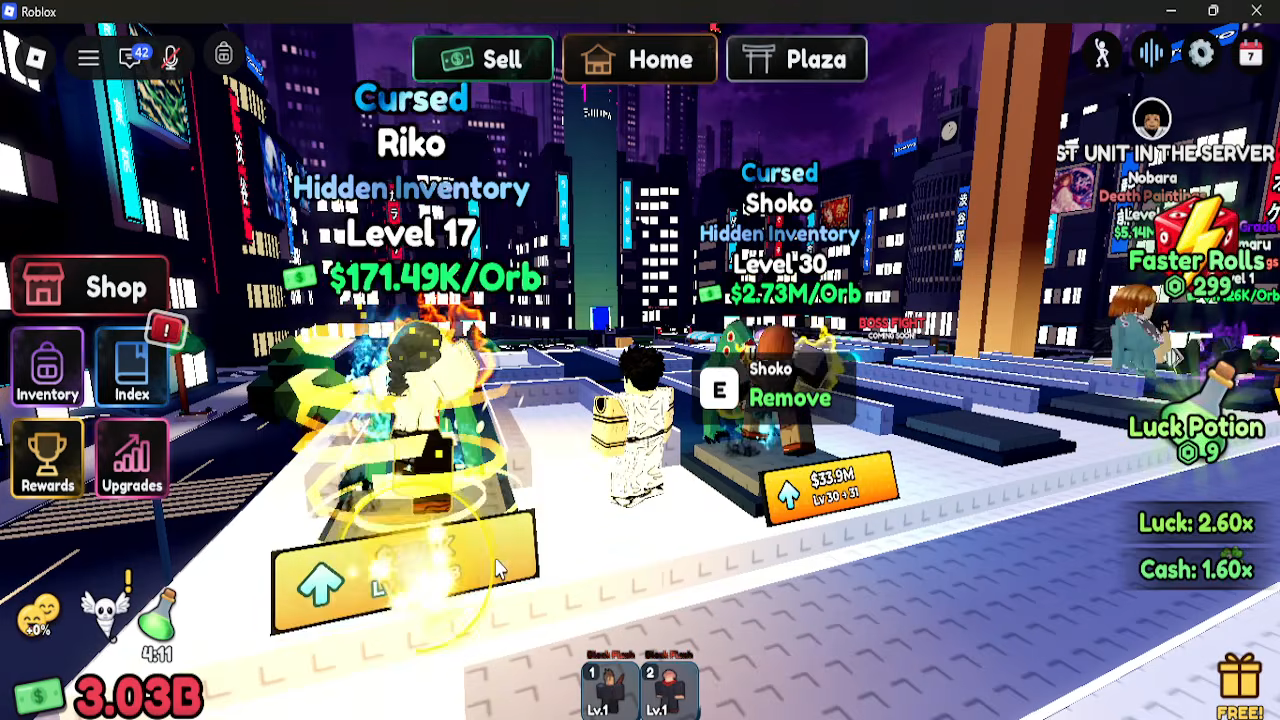
Place your unlocked characters on your own plot — specifically on the first floor of your farm. A character standing on your plot generates money automatically, and its visible $/Orb rate shows how much each Orb it produces is worth.
- You place a character after unlocking it from a Sealed Cube.
- The first floor of your plot holds at least ten placements.
- Out of room? The Base Expansion upgrade in your plot's UPGRADES panel unlocks another slot.
The earning step happens on your own farm: placed characters generate money on your plot. In Jujutsu Farm, opening sealed cubes unlocks Jujutsu Kaisen characters, and placing those characters on your plot is what makes them generate money for you. Until a character is standing on your plot, it isn't earning anything.
How to place a character, step by step
- Open a Sealed Cube to unlock a character. If you haven't unlocked one yet, see our beginner guide for the full starting route.
- Place the character on the first floor of your plot. This is the designated placement space on your farm — Kogane's tutorial tracks it directly with the task "Fill the first floor of your plot", which counts up to ten placements, so the first floor holds at least ten characters.
- Confirm it's earning. A placed character displays its Orb earnings rate right on the plot (for example, a character at Level 1 showed $18.50K/Orb in one session). When you can see a $/Orb value on the character, it's placed and producing money. The same panel also has a Remove button if you want to take a character off the plot later.
There's also a shortcut straight from the roll itself: when the conveyor machine produces a Sealed Cube and it opens into a character, you can choose to spend cash to Purchase it into your inventory, or place it directly from the roll result without stopping at your inventory first.
Your plot has limited slots — expand with Base Expansion
Characters occupy slots on your plot, and you only have so many at the start. When you run out of room, open the plot's UPGRADES panel and buy Base Expansion, which is described as "Unlock another slot". That panel also contains other plot upgrades (Luck Boost, Cursed Energy Cash Boost, Open Time Boost and Walk Speed), so Base Expansion is the entry to look for specifically when capacity — not luck or speed — is what's holding you back.
Filling the first floor is an early goal for a reason: more placed characters means more money coming in at the same time, and the tutorial task rewards you for getting ten placements down.
How much a placed character earns
Each placed character shows a cash-per-Orb rate, and that rate reflects its actual earning contribution. It grows fast with levels: in one recorded session, a Star Nanami at Level 1 showed $18.50K/Orb, and after the player upgraded the same character to Level 29 its rate displayed $1.90M/Orb. Those exact numbers came from that session, so treat them as an illustration of the range — not fixed rates your account will match.
The rate you see is also how you can compare placements: after upgrading a character or swapping in a different one, the $/Orb value tells you what each spot on your plot is currently producing. For the systems that raise a character's value beyond levels, see our guides to grades and traits and how to upgrade characters.
Why placement is the key step of the whole loop
Placement is the point where characters start working for you. Money from placed characters pays for better cubes, and upgrading placed characters raises how much each one earns — so the loop keeps feeding itself: place, earn, buy better cubes, unlock stronger characters, place them too. If your characters are unlocked but not placed, none of that loop starts.
Once your first floor is filling up, Base Expansion keeps the loop going by adding the slots you need for the next wave of unlocks.
Related Guides
How to Upgrade Characters and Boost Earnings
Upgrade placed characters level by level: where the button is, what a level costs, and how each level lifts per-Orb earnings.
Base Expansion: How to Get It
Find out how to buy Base Expansion, what each new plot slot adds, and how far expansion can go.
Base Guide: What Your Plot Does
Understand what your plot controls, how plot slots and upgrades work, and why expansion caps your whole team's income.
Best Team: Building a Money-Earning Lineup
Build a stronger money team: plot slot limits, which characters to prioritize, and the upgrades that raise whole-team income.